
30 September 2026
Version 8.2.0
This release introduces the Co-Builder Planning Agent. It turns an uploaded Word template or completed precedent into a proposed form (sections, fields, logic, calculations, conditional rules and repeats) that you review against the document before anything is built. It is joined by Live document drafting preview, which renders the document beside the form as you answer, using the same engine that generates the final output.
Other highlights include Email automation moving to general availability, and fixes for Builder Add-in performance and e-sign anchors in PDFs.
What’s new:
Co-Builder Planning Agent
Every automation starts with a document - but until now, working out how it should become a form was entirely manual. Co-Builder’s new agent changes that. Upload a marked-up template and Co-Builder proposes the form's sections, fields, logic, calculations, conditional rules and repeats.
Review each suggestion against the highlighted document, direct changes in the Co-Builder chat, then create the form and keep building with the Form Agent in the same conversation.
The Planning Agent will roll out to customers the week following this release.
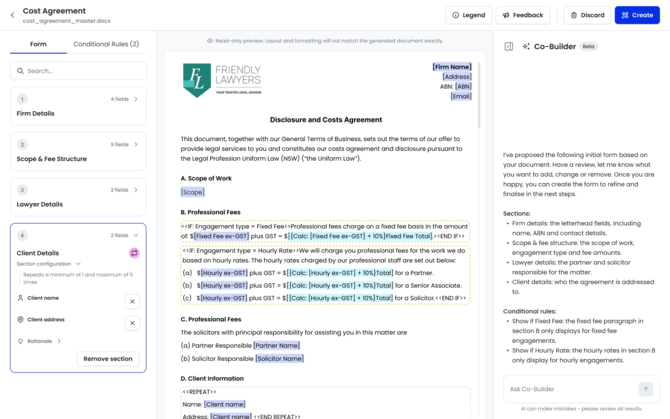
Co-Builder review of a proposed form from a template
🔗 Learn more here
Live document drafting preview
Until now, you couldn't see the document you were producing until the submission was complete. Live document drafting preview changes that. Open Preview draft and the document renders beside the form, updating as you answer. It is produced by the same engine that generates your final document, so what you see is what you'll get.
Switch between every document in the pack, click a highlighted placeholder to jump to the question behind it, and download the document as DOCX at any point. Available in builder Test, Form Library and the iManage integration.
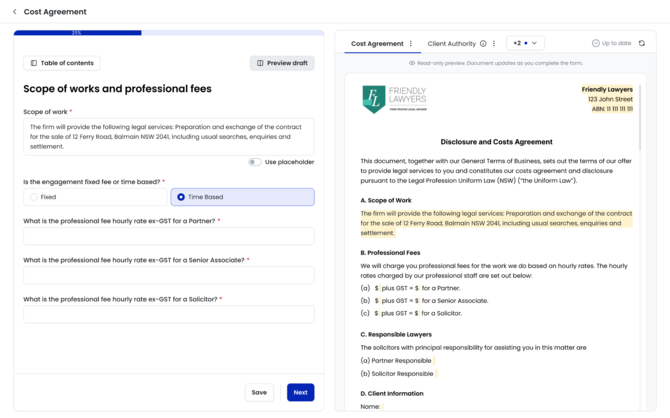
Document live preview
🔗 Learn more here
Other updates:
- Email automation moving from Beta to General availability
Bug fixes:
- Optimised performance for large forms and templates in the Builder Add-in
- E-sign anchors printing in PDFs
16 September 2026
Version 8.1.3
This release brings contact and user mapping and field alias support to the Co-Builder Form Agent, so builders can do two of the most common build steps in conversation instead of leaving the chat for a properties panel or mapping modal. Other highlights include performance and usability improvements to Co-Builder, new Title, Department, Supervisor and Supervisor's Position fields on the user profile, faster document generation, and a set of fixes to cloning, page breaks, image uploads and inline list formatting.
What’s new:
Co-Builder: Contact and user mapping
Mapping a section's fields to a contact or user profile means the drafter searches for the person at fill time and every mapped field populates itself - but until now it meant leaving the chat and pairing each field by hand in a modal. Now you just ask, and Co-Builder works out the mapping type and field pairings and presents them as a plan to approve, revise or reject. It will also raise mapping proactively when a new section looks like a candidate. Existing pairings are never touched unless you ask.
Co-Builder: Support for field aliases
Field aliases are how data is shared across forms, and a near-duplicate alias silently breaks that sharing. Co-Builder can now apply, change, remove and read aliases on request - one field or a whole section in a single plan - reusing an existing tenant alias wherever it can and validating every change. Alias behaviour is strictly reactive: Co-Builder never adds or suggests an alias you didn't ask for.
🔗Learn more here
Other updates:
- User profile gains new fields for capturing firm structure; Title, Department, Supervisor and Supervisor's Position
- Co-Builder now uses virtual scrolling, keeping long conversations responsive.
- Co-Builder batches multiple tappable option questions into a single carousel, rather than asking them one after another.
- Co-Builder now refers to a Test as a Preview, matching the language used elsewhere in the product.
- Speed optimisations on the document generation process.
- Cloning a field no longer copies across the field alias or the mapped record type - these are deliberately left blank on the clone so aliases aren't duplicated by accident.
- A cloned submission or test can now be renamed as part of cloning, instead of being renamed afterwards.
- Logic indicator state is now shown on Templates and on Select field options.
- The note input is focused automatically when you create a new note in Form Settings > Notes.
- The Permission Set "Filler" tab has been renamed to "Drafter", in line with the terminology used across the platform.
- Updated Smokeball icon to align with their brand refresh.
Bug fixes:
- Fixed an issue where a disabled middle-name sub-field still populated in the generated document when cloning a submission that originally had a middle name.
- Fixed an issue where form sections did not come through correctly due to a page break issue.
- Fixed an issue with iManage issue causing a mismatch that prevented users from setting up a data source for iManage.
- Fixed formatting issues on the image upload field in Smarter Drafter Pro forms.
- Fixed inline list formatting in templates, where entity names containing multiple "and"/"or" were corrupted with commas in generated documents.
2 September 2026
Version 8.1.0
This release introduces Restrict Users for user mapping, giving builders control over exactly which users and groups a drafter can choose in each user-mapped section - so the right people surface in the search and the wrong ones can't end up in a document. Other highlights include Clone & Submit, download format and print options on submission review, a set of field alias improvements, continued Form Agent updates in Co-Builder, and a variety of smaller updates and bug fixes.
What’s new:
User Mapping: Restrict Users
User mapping lets a drafter search for a person and auto-populate their details straight into a form - but until now, that search returned every active user in your tenant. A "Solicitor details" section would surface all 120 users, not just your solicitors, leaving drafters scrolling a long list where picking the wrong person means incorrect details carried into a legal document. Restrict Users changes that.
A new Restrict Users tab in the user field map lets builders define, per user-mapped section, exactly which users and groups appear in that section's search. The searchable pool is the union of the users you select directly and the live members of any groups you select, resolved at runtime - so it stays accurate as group membership changes and users are deactivated, with no maintenance on the form.
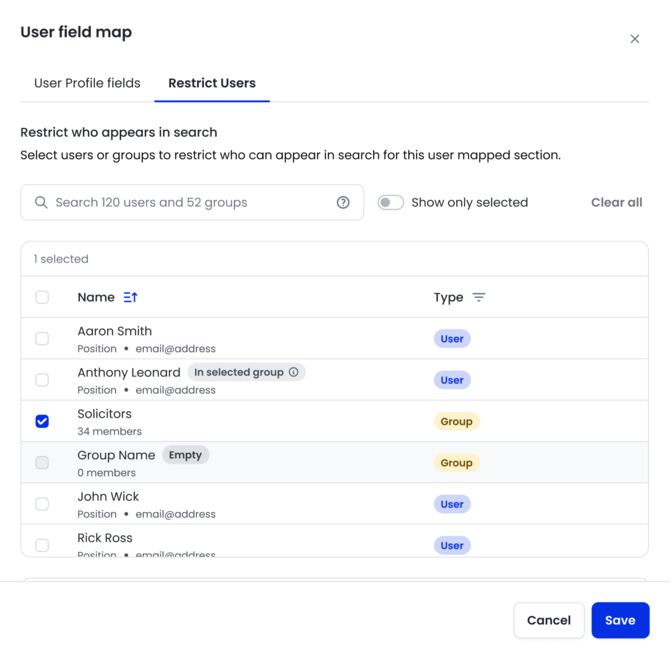
Restrict Users in User Mapping
🔗Learn more here
Other updates:
- Clone & Submit a Test - clone a submission and submit it in one flow. Supported for tests in Submitted or Generated status.
- Submission review now offers a specific download format and a print option.
- Word add-in: Address component now supports address line 1 and line 2.
- User mapping modal updates - added a help article link and refreshed the update button UI.
- Field alias improvements:
- Replace has been changed to search in field alias.
- Field alias search now brings back only compatible field aliases.
- Validation check added when changing the type of a field that has an alias.
- Form Agent (Co-Builder) updates:
- "New Page" now defaults to enabled for every section the Form Agent creates.
- Selection-aware context chip added to the Co-Builder chat input for sections and fields.
- Support for setting the layout type on radio and checkbox fields.
- Support for adding, updating and removing "Minimum characters" and "Maximum characters" properties on text fields.
- Restyled field and section chips in sent Co-Builder messages.
- Restyled Co-Builder chat input scrollbar and growth behaviour.
- Updated pagination on the Conditional Rules and Replacement Rules tables in Form Builder.
- Calculation builder UI fixes.
- Design system primary blue colour changes.
- Removed the "Additional options" accordion and One Page Portal image upload from the New Folder modal.
- Removed .zip from the accepted file types for Additional attachments on the Email template modal.
- Ability to use a code name from a deactivated discount code
- Intake table of contents toggle aligned to primary button color option
Bug fixes:
- PDF generated changing text format
- Incorrect data pulling through from Actionstep
- User mapping: user details now populate correctly in repeated sections without needing a manual screen refresh for each repeated section.
- Phone field: added the missing character validation for minimum and maximum character limits.
- Email automation: fixed the signature being inserted mid-email in Outlook New.
- Email automation: numbered lists no longer generate as plain text.
- Dropdown selected value text is now vertically centred (removed excess padding below the text).
- Fixed the confirmation modal lag when replacing a field alias.
- Word add-in: the Case option no longer disappears when changing the Component on organisation/office addresses.
- Co-Builder: a dismissed clarification no longer binds the next message as its answer in the transcript.