
Co-Builder Form Agent is an AI inside the form builder. Instead of creating sections and fields one property at a time, you describe what you want in plain language and Co-Builder proposes a plan showing exactly what it intends to do. You approve, revise, or reject that plan. Nothing is written to your form without your approval.
Form Agent is the first of a set of Co-Builder capabilities that will cover the whole build: planning your automation from the template document, building the form, coding the document template, and testing the finished automation. Additional agents will be released progressively.
Co-Builder Form Agent is an early beta. It handles the form build only. Read each plan before approving it, and test your form as you normally would. Document generation is unchanged, so a published form still produces the same document from the same answers every time.
How to
1. Open a form in Draft and go to the Form or Document tab.
2. Click the new Co-Builder button to open the Co-Builder panel. On a brand new form it opens automatically.
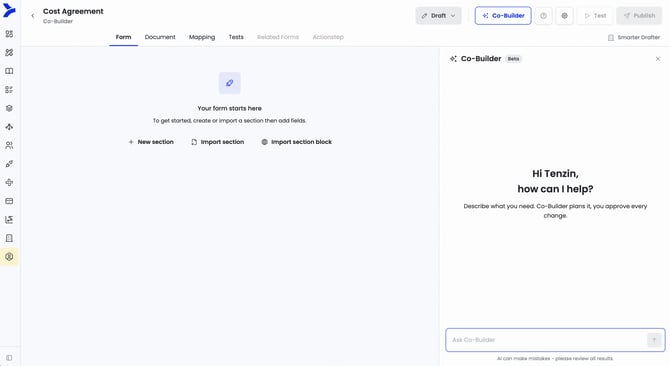
3. Describe what you want. Be specific about the section it belongs to, for example "add a client details section with fields for name, email and phone".
In this example we will ask "Capture Client details. I want to capture whether they're a company or an individual. When the client is an individual, I want to capture their name and date of birth. When the client is a company, I want to capture the company name and ABN."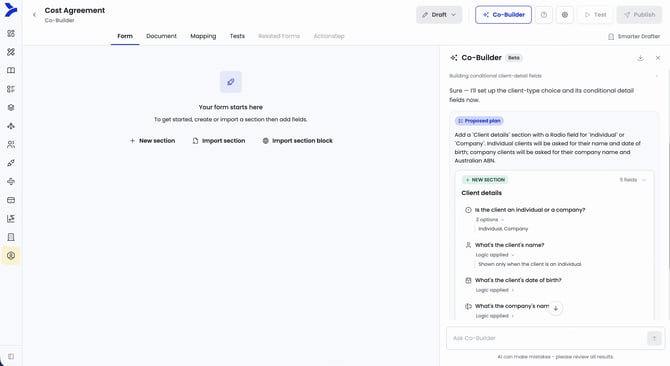
TIP: Click a section or field in the form and it appears as a context chip in the Co-Builder input. Your next prompt applies to that selection, so you can say "delete this" or "add a phone field" without describing which section or field you mean. Remove the chip to clear the context.
4. Co-Builder will propose a plan with the details of what is intended to be created or update. Review the proposed plan in full. Each section appears as a card marked New section, Edit section, or Delete section.
Each plan also shows its rationale for each plan with the option at the bottom to Apply, Revise or Discard.
Applying a plan will implement the proposed plan into the form. Revise will let the builder make changes as needed by telling Co-Builder. Discard will get rid of the plan and not implement the plan.
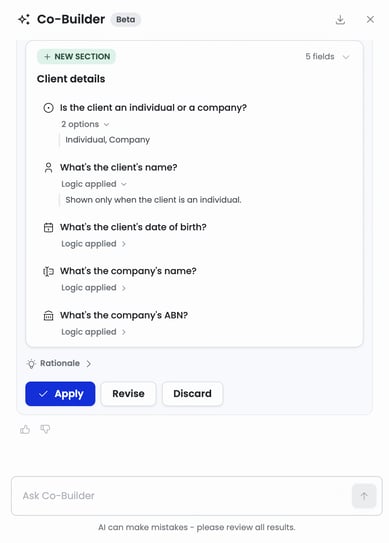
5. Select Apply.
6. Co-Builder will add the section and its fields to the form.
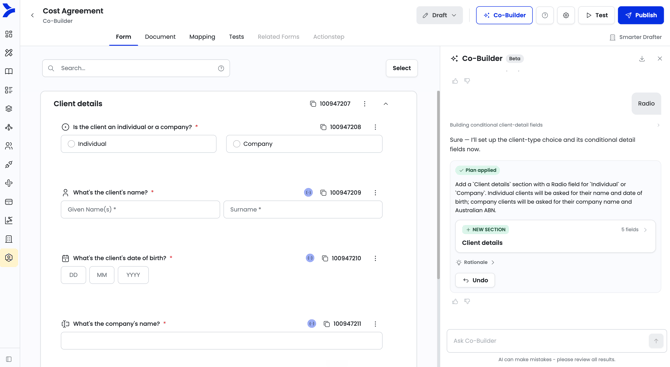
When adding logic, calculation or conditional rules, Co-Builder will update the notes with the natural human language explanation of the expression.
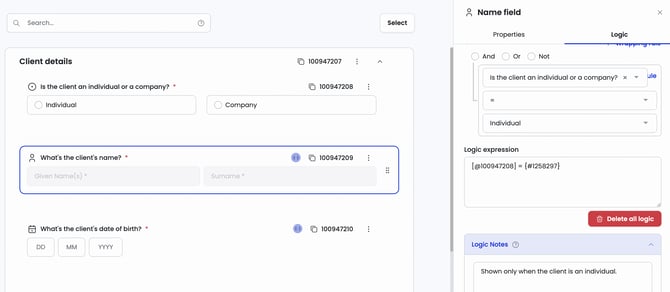
A plan can be Undone, which will revert the actions of that plan only.
Co-Builder capabilities
These are the current capabilities and limitations of Co-Builder Form Agent, additional functionality will be added progressively.
Co-Builder can:
- Create, read, update and delete sections, including repeatable sections, new page and hide heading options
- Create, read, update and delete fields across all field types, and set their properties and validation
- Manage options on select fields, including setting an Other option
- Create, read, update and remove logic, calculations and conditional rules of simple to moderate complexity
- Explain existing logic, calculations and conditional rules in plain language
- Fix errors with logic, calculations and conditional rules
- Import and remove reusable section blocks you already have access to
- Answer questions about your form, such as how many sections it has, which fields have logic, or what a field or section ID refers to
- Publish the form
- Add, update and remove field aliases
- Apply contact and user mapping, either automatically when building a relevant section or when you ask for a specific section or field to be mapped
- Use a selected section or field as context, so you can say "make this required" or "add an email field here" without naming it
Co-Builder cannot yet:
- Map record types to fields
- Clone a section or field
- Discover option sets and add them to a select field
- Exclude individual sections or fields from an imported section block
- Manage replacement rules, form settings or email automation
- Work on a published form. It is available in Draft only
- Answer anything outside form building in Smarter Drafter
If you ask for something unsupported, Co-Builder tells you rather than attempting it.
TIP: Your feedback ratings are the primary way we improve Co-Builder during beta. A thumbs down with a short comment is far more useful to us than an abandoned conversation.
FAQ
Q: Can other people see my Co-Builder conversation?
A: No. Conversations are private to you and to the specific form, even when colleagues are working on the same form.
Q: Co-Builder disappears when I'm not in Form or Documents tab in Draft
A: Co-Builder at this stage only supports capabilities within the Form and Documents tab therefore it will not appear across all parts of the form. As additional capabilities span the form it will be made available.
Q: Can I edit the form while a plan is being applied?
A: No. The form is read-only until the plan finishes applying, which prevents your manual edits from conflicting with Co-Builder's changes.
Q: Why can't I see Co-Builder on a form?
A: It appears only on forms in Draft, and only for Builders with edit permissions. Read-only access means Co-Builder is hidden.
Q: Does Co-Builder generate documents?
A: No. It helps you build the automation. Documents are produced by the same engine as always, so output stays consistent every time.
Q: Is my data used to train the AI?
A: No. Smarter Drafter uses Microsoft Azure OpenAI which guarantees this claim. For any information security related queries, get in touch with our support team to learn more.
Q: How accurate is it?
A: Good on straightforward, clearly described work, less reliable at this stage on ambiguous instructions or complex conditional logic. The plan step exists so you catch mistakes before they reach your form. If a plan is close but not right, use Revise rather than starting over.
Q: What if Co-Builder does something I didn't ask for?
A: Undo the plan if it was the most recent one applied, then give it a thumbs down and describe what happened. If an earlier plan is the problem, ask Co-Builder to correct the specific change directly.
Q: Can I start a fresh conversation on a form?
A: Each form keeps one ongoing conversation that persists when you close the panel or reload the page.
Q: Why is it slow or unresponsive sometimes?
A: Large forms and long conversations take longer to process, and beta capacity is limited. If a response stalls, wait before retrying so you don't create duplicate plans.
Q: What's the difference between clicking a field and using @ mentions?
A: Both give Co-Builder context. Clicking adds the selected section or field as a chip in the input; @ lets you reference any field or section by name while typing. Use whichever is faster.