
26 November 2025
Version 7.1.0
This release introduces big improvements to the form building experience to help simplify the workflow, streamline actions to reduce unnecessary clicks and improved UI/UX. We’ve rolled out Matter Record to centralise and reuse matter-related data to reduce re-keying in forms and opened up this concept via APIs to add external data sources.
Additionally, Form Roles is now Record Types with new capabilities to improve how to categorise data better as Roles or Matter Details. A new permission to manage viewing Submissions in Smarter Drafter Pro web application and Word add-in for form fillers is also now available.
🌟 What’s new:
- Builder Optimisations
We’ve spent the last few months gathering detailed feedback from Smarter Drafter Pro builders across firms of all sizes. You told us that while the form-building engine is powerful, it needs to be faster, clearer, and easier to master.
We heard you. With these changes, our goal is to drastically reduce your time to value. We are stripping away unnecessary complexity and reducing clicks to make the interface more intuitive. Whether you are a new user getting started or an experienced builder looking for speed, these updates are designed for you.
The changes fall into a few key themes:
1. Simplifying the lifecycle
The Unversioned state has been removed. Every new form now begins in Draft mode to create a cleaner, more predictable workflow. Any Unversioned forms will remain in that state and can still be published.
2. Cleaner, more focused workspace
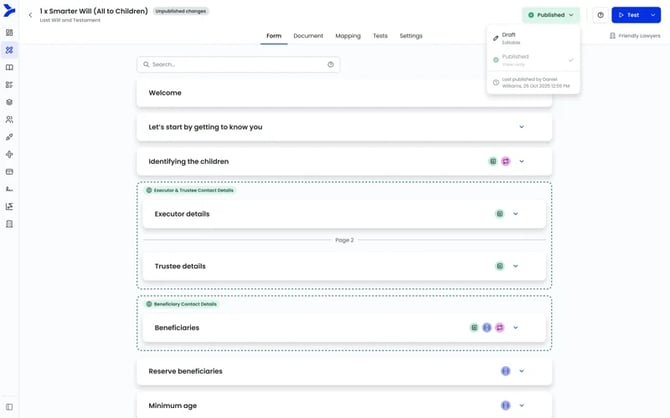
To give builders more room to work:- The top header is replaced with a streamlined form-specific header.
- The main build menu collapses automatically when you enter the builder.
- Preview becomes Test, and both Test and Publish are now visible actions rather than hidden in the Options menu.
3. Clearer navigation and tab structure
We’re improving the flow of the builder by adjusting labels and order:- Submissions becomes Tests to avoid confusion with live data. Any Tests created will stay in Tests and any live submissions created from Form Library will no longer be seen in Tests.
- Any prior 'Previews' will be visible in Submissions. Any new Tests will be available in Tests.
- Role Mapping becomes Mapping.
- Tabs are reordered to reflect how builders actually work: Form → Document → Mapping → Tests → Actionstep → Settings
4. More intuitive field-building
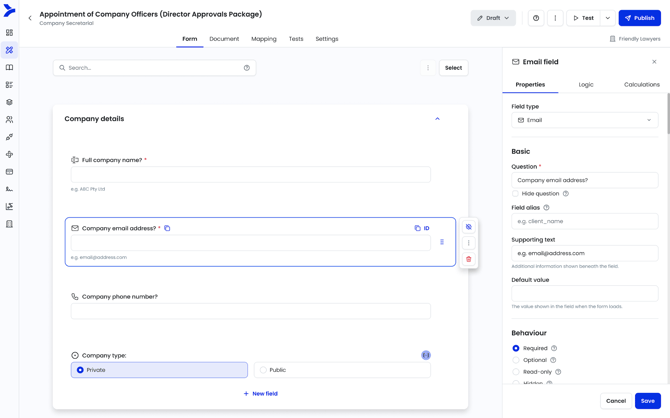
To help you move faster and reduce visual noise:- Adding a field automatically opens the Properties Panel with the Question field selected.
- Field icons and handles stay hidden until you hover—keeping the form cleaner.
- Clear indicators now show when a field or section is Contact-mapped or User-mapped.
- Bulk actions (move, copy, delete) now sit behind a Select button instead of always-visible checkboxes.
5. Improved field categorisation
We’ve reorganised field types into six clearer categories:
-
- Contact, Text, Select, Numeric, Identification and Other.
- And “Select” has now been renamed to Dropdown for consistency.
-
Matter Record - automatically save and reuse data in Smarter Drafter
We are introducing Matter Record to improve the reuse of matter data, storing all associated data within Smarter Drafter Pro to ensure consistency and reliability. By reducing the reliance on manual re-keying, Matter Record ensures that data is consistent, accurate, and reliably reusable across all documents pertaining to the same matter.Smarter Drafter will store data as records, which can then be assigned to a form to bring in the relevant information. Records refer to persons, companies, properties, court room details etc that exist for a matter.
🔗Learn more about the concept of Matter Record here
🔗As a form filler, learn more about filling in a form with Matter Record data here
🔗As a form builder, learn more about how to setup a form for Matter Record here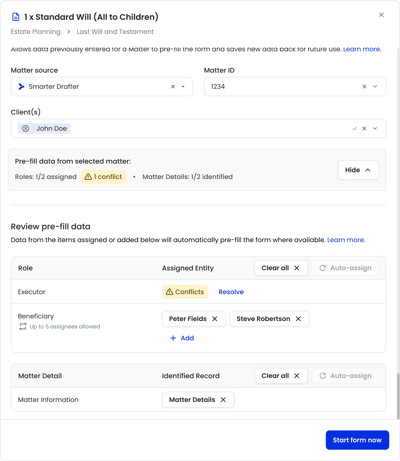
-
Integrate Matter Record via APIs
With the launch of Matter Record, we are enabling customers to programmatically access Smarter Drafter Matter Record capabilities, allowing for seamless integration with any system of record to push and pull data directly with Smarter Drafter.- Smarter Drafter will allow the ability to create custom matter source(s) via Integrations > Custom Data Sources.
- Matter Record APIs will enable matters from the source system to be created.
- Records can be created which stores entity information (eg, contacts) and matter specific data (eg, matter information).
- Once Records are populated in the Matter Record, when a form filler starts a form and selects a matter, Smarter Drafter automatically assigns the Record (based on the Record Type available in the form) and populates the data into the form.
- APIs will be made available to create Record Types and Field Aliases.
- APIs to query the latest changes and new records created will allow for bi-directional updates of source system.
- Form Roles is now Record Types
Form Roles will be referred to as Record Types from this release, along with a new category for each type to better identify as a Role or Matter Details. The reason for the change is the dynamic use of Form Roles as actual roles (eg, Client, Lawyer, Defendant) and also as matter details (eg, Matter Information, Trial Details, Employment Information). Referring to these as Record Types, with a categorisation as Roles or Matter Details helps to reduce the confusion on the use of this functionality.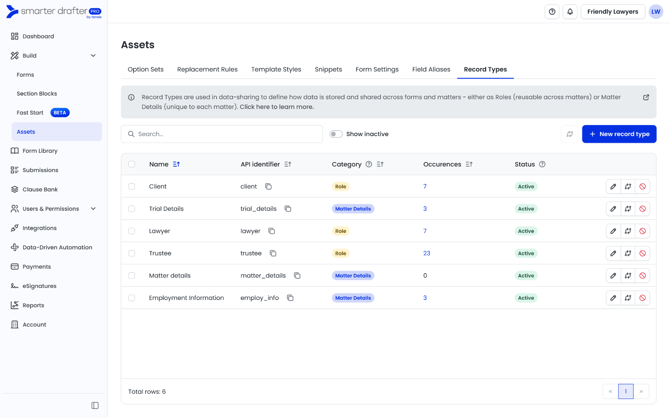
When creating a Record Type, if the Record Type is going to be used to categorise data for persons, companies or records that may be used in multiple matters, this is a Role. If the Record Type is going to be categorising matter specific data, such as matter information and data that should not be used across matters, this is a Matter Details category.Summary of changes:
- The Assets > Record Types page now includes a new Category column
- When a new Record Type is created its category of Role or Matter Details will need to be defined.
- Any existing Record Types in your tenant have been automatically migrated to the appropriate category (Role or Matter Details). If you believe any of these are incorrect please lodge a support ticket.
- Deletion of a Record Type is now changed to deactivate. When deactivating a Record Type, this will remove all mapping occurrences in forms.
- Ability to create a new Record Type from Assets > Record Types (previously this was only allowed from form mapping.7
- Other updates
- Permission to manage accessing Submissions in Smarter Drafter Pro web application and Word Add-in for Form Fillers
- API for creating and managing Groups
🔧 Bug fixes:
- Handling duplicate contacts from Unity when assigning party to a form
- Fixed help articles links for Unity and NetDocuments in Integration page
- UI issues with recycle and logic button in Word add-in
5 November 2025
Version 7.0.4
This release introduces the ability to use Office field in User Mapping to automatically map the right Office of the user selected by the form filler. A number of enhancements are also included to link new help articles, update Groups feature and handling repeatable sections when splitting documents.
🌟 What’s new:
- Office Field in User Mapping
Office fields can now be used in User Mapping, to automatically select the right Office of the user chosen. This saves time for form filler in choosing the right Office.
🔗 Learn more
- Other updates
- Update to New Fast Start Form dialog to include new help articles and clearer guidance on document template upload
- Removed Companies, Folders and Forms from Groups - permissions manage form and folder access
- Setting a repeatable section in a document template
🔧 Bug fixes:
- Issues with bold text when using Rich Text field
- Actionstep matter not sending document to Actionstep via deep link
- Replacement rules not working with date field