
25 February 2026
Version 7.2.5
This release introduces user experience improvements to intake submissions, along with additional features for intakes such as send back an intake to a recipient and intake answers webhooks. Minor changes to field label in submissions page, along with bug fixes.
🌟 What’s new:
-
Intake Submissions Enhancements
No more seeing double. We’ve consolidated the intake and document generation process into a single, submission entry.- New statuses: Two new statuses are introduced “With Recipient” when an intake is sent to the recipient to complete and “Recipient Complete” when it has been completed by the recipient ready for review.
- Unified Lifecycle: Track the entire journey - from "With Recipient" to "Generated" - under one clear record.
- Status-Driven Workflow: Instantly see where a matter stands with new, descriptive statuses like With Recipient, Recipient Complete.
- Decluttered Workspace: We’ve cleaned up the Submissions table, adding intuitive icons for intake-related tasks and a new filters so you can find exactly what you need in seconds.
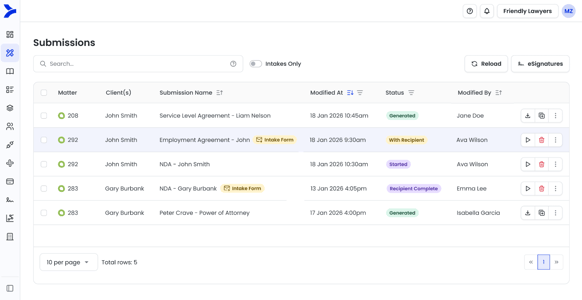
Submissions page with Intakes
-
Intake Forms - Send back to recipient
Need more information or a correction to an intake sent? Easily send an intake back to the recipient with personalised notes. The data they already entered stays put - they just update what’s missing.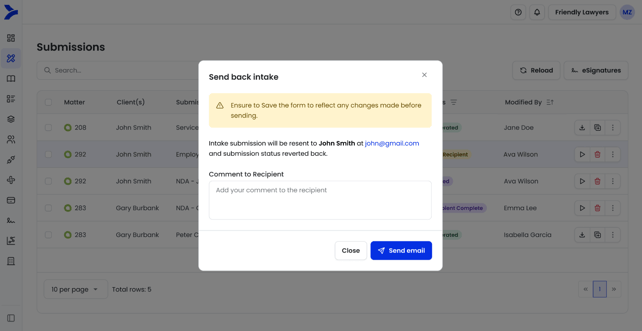
Sending back intake form
- Other updates
- Changed one-time pin to always send from a Smarter Drafter email address
- Intake forms webhooks - learn more
- Renamed from ID to Submission ID
- New field Created Date captures created date for submissions
- Renamed Date to Last Updated Date - this is the initial date when the submission was first created
- Renamed User to Created By - this will always be a SD user
- Renamed Intake Name to Intake Recipient Name
- Renamed Intake Email to Intake Recipient Email
- Renamed Intake Phone Number to Intake Recipient Phone Number
- Removed Documents from Submission column - this is available as a clickable link in the Submission details side panel
🔧 Bug fixes:
- API Address formatting issue
- Section Block - Error check showing error check for already used conditional rules
4 February 2026
Version 7.2.0
This release introduces significant improvements to our Intake offering by improving security posture and supporting matters and matter record. User provisioning now supports SCIM framework allowing identity providers such as Microsoft Entra to be integrated to create users and groups.
Additionally, forms started now will open in the same browser tab, a new notes section in Form Build Settings and the ability to create field aliases in Assets > Field Alias.
🌟 What’s new:
- Intake Form Security Enhancements
One-time pin (OTP) will be required on all intake forms sent to the recipient. When the recipient accesses the shared link or the link via email, they will see a page to allow them to request a code. The code is sent to the email address of the recipient that was entered when sending the intake form.
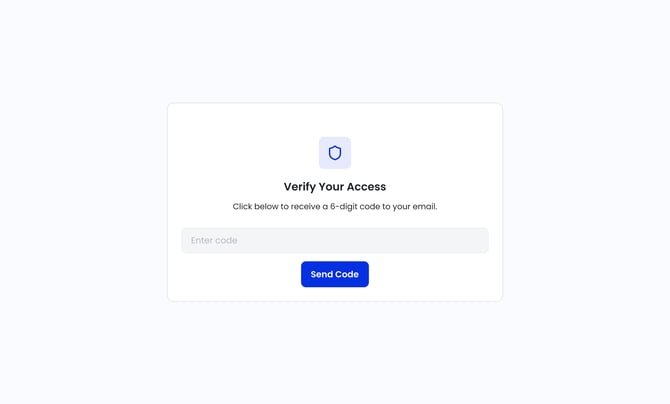
OTP page when a recipient accesses the intake link sent -
Intakes forms supporting matters and matter record
When sending intake forms, the ability to add matters and re-use data from matter record is now supported.- Matters can be included to link the intake, as well as leverage the capabilities of matter record to automatically populate already known data.
- Sending with pre-filled answers or with blank answers will be asked at the start.
- Sending with pre-filled answers will allow the matter record to be activated, and also the sender to manually fill in any known data before sending to the recipient.
- Sending with blank answers will not open the form nor populate it with any data. Instead it will ask for the recipient details and then send the form, saving time in having to load the form and making those extra clicks.
- Adding a recipient will search for your contacts or records created using the matter record.
- This will automatically populate the given name, surname and email address for the recipient.
- Customers will need to configure the field alias mapping to select the right field alias against the given name, surname and email address fields. This will be possible in a new area in Assets > Intake settings > Recipient Mapping
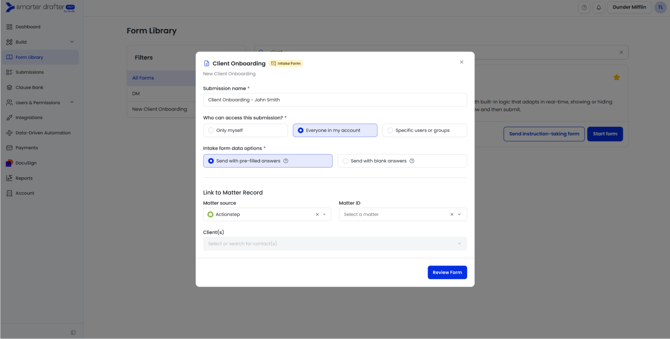
Select matter and send options for intakes
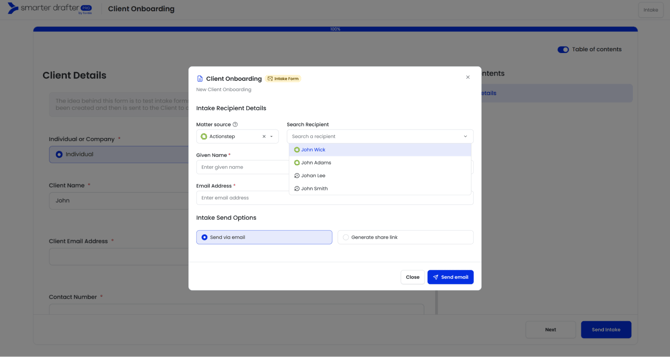
Selecting recipient when sending intake
🔗Learn more
- User Provisioning via Entra
We have streamlined user management by adding support for the SCIM framework. You can now automatically create, update, and manage users and groups in Smarter Drafter directly through your Identity Provider (IdP), such as Microsoft Entra. This ensures your team list is always in sync without the need for manual updates.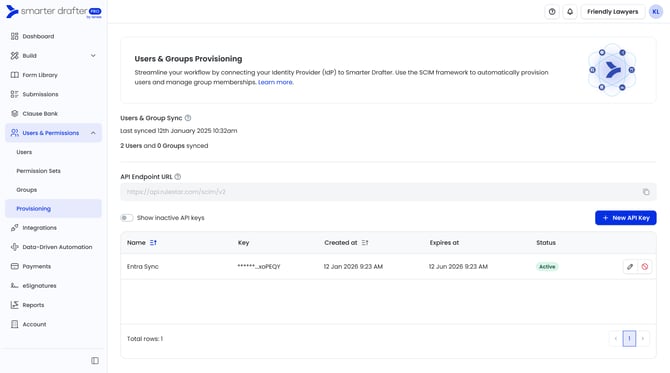
Provisioning in Users & Permissions
- Enhanced Form Security
Additional checks in the background will now be performed when a user accesses a link to a form in progress to further enhance security posture. The changes will require a form started to no longer open in a new tab - a change that also helps improve user experience. Navigation to return during or at the completion of a submission will be made available. - Other updates
- Create field aliases from Assets > Field Alias
- Notes in Form Build Settings to help comment on any changes or worthwhile information throughout the lifecycle of the form build.
- Re-organised intake features into a new area in Assets called Intake Settings
- Email template personalisation option Submission Reference will now display the link to the submission to take you directly to the submission in Smarter Drafter
🔧 Bug fixes:
- Deep link not being able to select Smarter Drafter as matter source
- Scrolling issue when a field has lengthy logic applied