
Legal matter data is relational. A loan has borrowers, those borrowers have security properties, a will has beneficiaries who each inherit certain assets.
In Smarter Drafter, a builder can create a Linked field, which defines an explicit, structured relationship between records, so that connection is captured and stored. Once the relationship exists, the document can traverse it directly: list every Loan, and under each, its Borrowers; or list each Beneficiary and the Assets they inherit. The relationship holds, and it's bi-directional, so you can express it from either side (all properties for a defendant, and all defendants for a property).
How it works
Records and roles
A Linked field connects two records. A record is something captured once in the form and reused throughout the matter, such as a customer, a loan or a property. The same record can play different roles depending on the relationship: one customer might be a borrower on one loan, a guarantor on another, and a mortgagor on a property. The customer is entered once and stays a single record; the role is what changes from one relationship to the next.
This is the idea Linked fields are built on. Instead of re-entering the same person under each role, you capture them once and then link that record into each relationship, assigning the role it plays there.
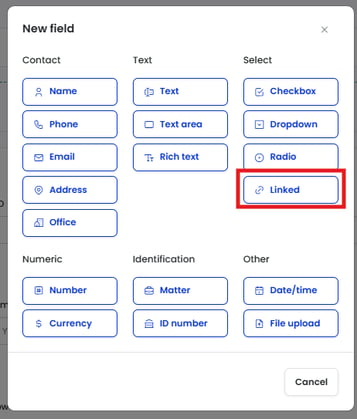
Access Linked field from New field modal
Linked field defining relationships
Every Linked field is defined by three settings. Read together they describe one relationship in plain terms. Take a field that links the borrowers on a loan: the customers I pick are borrowers on this loan.
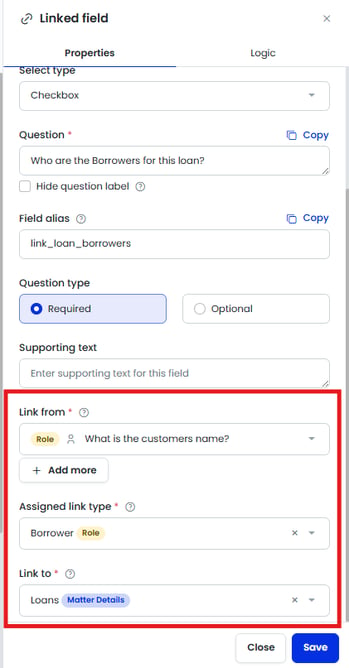
Linked field properties panel
Link from is the list you're choosing from - the records that become the options the drafter selects. In the pictured example above, this linked field captures who the borrowers are for a loan. The link from is derived from a prior section that captured customers, so the drafter picks from customers already entered. Each option shows a pill for its record-type category.
Assigned link type is the role those chosen records take on through the link. Selecting Borrower means every customer picked becomes a Borrower on this loan, on top of still being a Customer. The record isn't copied or changed, it carries an additional role. The roles you can assign depend on the record's category, covered below.
Link to is the record in the current section the chosen records connect to. For the borrowers field this is the loan, so the relationship stored is "this customer, as a Borrower, belongs to this loan." Link to only becomes available once Assigned link type is set, because there is no relationship to point anywhere until the role is named.
Put together - Link from the customer, Assigned link type Borrower, Link to the loan - the field captures and stores the relationship between a loan and its borrowers, ready to pull into the document.
Role and Matter Details categories
What you can assign in Assigned link type depends on the category of the Link from record:
- If the Link from record is a Role category, you can assign any active Role record type in the tenant. This is what lets one customer play several roles across a matter.
- If the Link from record is a Matter Details category, Assigned link type is locked to that same record type, because a Matter Details record can't take on a second role.
Learn to build a form with Linked records in the next article here
Common questions
Q: What's the difference between a record and a role?
A: A record is the entity you capture once, like a customer or a loan. A role is the part it plays in a particular relationship, like Borrower or Mortgagor. One record can hold several roles across a matter.
Q: Does assigning a role create a new record?
A: No. The role attaches to the same underlying record. A customer assigned as a Borrower is both a Customer and a Borrower, not two separate records.
Q: What does bi-directional mean for a relationship?
A: The link can be read from either side. If a borrower is linked to a loan, you can list all borrowers for that loan, and equally list all loans for that borrower.
Q: Why is Assigned link type sometimes locked?
A: Because the Link from record is a Matter Details category, which can't play a second role. When you link from a Role category record instead, you can assign any Role in the tenant.
Q: Can I use an imported section block field to link from?
A: Yes. A Linked field can reference fields from an imported section block to define the Link from.
Q: Why can't I add a Linked field to my first section?
A Linked field references a record captured earlier in the form, so there has to be a prior section to link from. Capture your source records first, then add Linked fields in later sections.
Q: Can one section have more than one Linked field?
Yes. The Loan section in this example has two (Borrowers and Guarantors). Two Linked fields in the same section can't share the same Assigned link type, though — each must assign a different role.