
Markup tells Co-Builder exactly what varies in your template: which text is a placeholder, which content is conditional, what repeats and what's calculated. It's plain text you type into your Word document, so no add-in or special tools are needed.
A marked-up template gives you the most accurate proposal and the least to review. Co-Builder can analyse a completed precedent without markup, but it has to infer what varies, so accuracy is lower. You don't need to mark up everything. Anything you leave unmarked, Co-Builder will still try to identify.
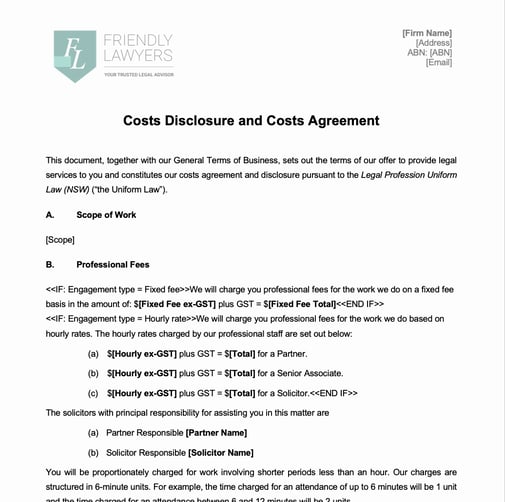
Marked up document template
Markup reference
| Type | What it does | Syntax | Example |
|---|---|---|---|
| Placeholder | Becomes a field in the form |
|
|
| Select options | Makes the field a select with set choices |
|
|
| Logic | Only asks the field in certain cases |
|
|
| Calculation | Works out the value from other fields |
|
|
| Conditional content | Includes content only in certain cases |
You include a placeholder field within a condition by using the [Name] syntax in the condition |
|
| Repeating content | Repeats content for each entry |
|
|
How to
1. Open your template in Word and save it as a .docx file.
2. Mark each variable as a placeholder. Use the same name every time the same value appears.
TIP: Use descriptive names. Co-Builder uses them to name your fields, so [Client name] gives a clearer form than [Name1].
3. Add options, logic or calculations to placeholders where needed.
4. Wrap conditional content in IF blocks and repeating content in REPEAT blocks.
5. Check your headers, footers and tables. Co-Builder analyses these too.
6. Upload your template. See Start a Form from a Template with Co-Builder.
Common questions
Q: Do I have to mark up my template?
A: No, but we highly recommend it to improve the accuracy of the output. Co-Builder can analyse an unmarked template or a completed precedent, but it has to infer what varies, so the proposal will be less complete.
Q: Do I need to mark up every occurrence of a placeholder?
A: Yes. Mark each place the value appears, using exactly the same name. Co-Builder proposes it as one field and records every instance.
Q: Can I use more than one type of markup on a placeholder?
A: Yes, you can combine logic and options, for example [{Logic: Client type is Company}{Options: Pty Ltd, Trust}Company structure].
Q: How should I write a condition?
A: In plain language, using the placeholder name, for example "Fee type is Fixed Fee". [confirm]
Q: Can I put markup inside other markup?
A: Yes. Placeholders can sit inside IF and REPEAT blocks, and an IF block can sit inside a REPEAT block.
Q: Can I use ELSE in an IF block?
A: Not yet. Use two IF blocks with opposite conditions instead.
Q: My firm already uses its own markup. Do I need to change it?
A: No. Open Document Markup on the Template details page, select Define my own syntax for that type, and describe your convention with an example.
Q: I've marked something up but Co-Builder didn't propose it. Why?
A: Check the markup matches the syntax exactly, including brackets and colons. If you're using your own syntax, make sure your description includes a clear example. You can also ask Co-Builder to add it in the chat on the Review page.
Q: What happens to the markup after the form is created?
A: At this stage the markup will remain in the document template as is. A future enhancement to code the template will change this to a coded variable.