
20 May 2026
Version 7.4.0
This release introduces our new MCP server to enable form discovery and drafting a document through an AI platform such as Claude or Copilot. Minor improvements to areas such as downloading generated documents, client field in start form and added support for custom data sources in various areas of the platform.
🌟 What’s new:
Smarter Drafter MCP
Lawyers are spending more time in AI platforms than ever - but until now, producing a firm-approved document still meant leaving that workflow to open Smarter Drafter separately. The MCP server changes that.
By connecting Smarter Drafter to your AI platform via the open MCP standard, you get the best of both: the conversational intelligence of AI to gather information naturally, and the deterministic precision of Smarter Drafter to produce documents you can actually put in front of a client. No tab-switching, no manual form filling, no hallucinated clauses.
Describe what you need, answer a few questions, and your firm-approved document comes back directly in the conversation - in PDF or DOCX, ready to download.
The MCP server is available in private beta to invited customers and partners. If you're interested in early access, contact your partner or Smarter Drafter contact.
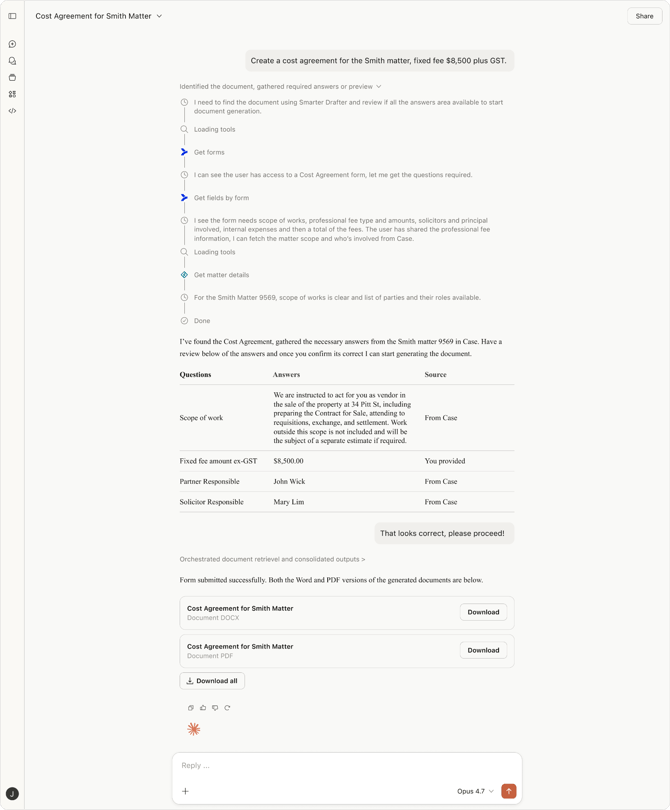
SD MCP in Claude generating a cost agreement
🔗Learn more here
Other updates
- Updated interface for Download Generated
- Client field in start form now syncs with records that play Client role
- Custom data sources will automatically populate when starting a form if there is only one option available to the user
- Search added to selecting currency type
- Support matter name and external ID when selecting a custom data source for iManage matter mapping
🔧 Bug fixes:
- Removed requirement for middle name when creating new user
6 May 2026
Version 7.3.12
This release introduces a redesign to the start form experience to improve the way matter records are assigned making it more intuitive. Other highlights include support for middle name in Name field, a new formatting option to hide content when its a last repeat and a variety of smaller updates.
🌟 What’s new:
Matter Record Assignment Optimisations
We’ve listened to customer feedback and made the matter record assignment when starting a form more intuitive. Here’s what's new:
-
A full-page start form experience
The start form modal becomes a full-page view, giving drafters room to actually see what they're doing. Form name, intake/test pill, and folder path move up to the header. The screen auto-scrolls to the Assigned Records section so drafters immediately see what needs their attention.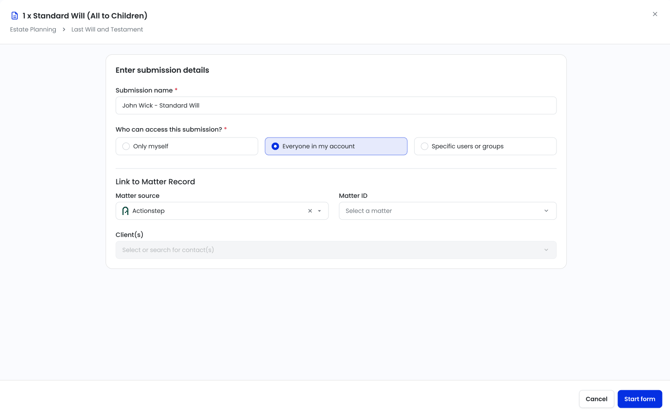
-
A redesigned record assignment view
Record types are now grouped clearly by Roles and Matter Details. Each record type shows its assigned records directly — no more collapsed totals. Action buttons are context-aware: an edit icon when a record is assigned, an add button when it isn't.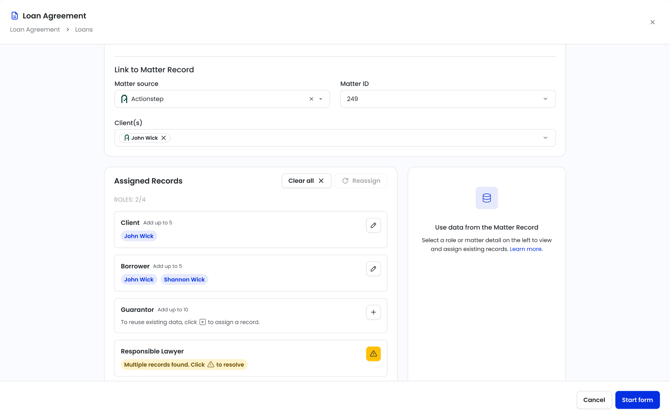
- Assigning records is simpler
Clicking add or edit on a record type opens a searchable, A-Z list of available records. Each record shows the roles it already plays (with a +N indicator and tooltip for records with many roles). Drafters can also pull in records from other matters in the tenant for Role-type record types — no more starting from scratch.
-
View and edit record data inline
Every record now has an info icon that opens its details — the record types it's assigned to, and the field data behind it. Drafters can edit field values inline (with validation based on field type), unassign individual roles, or delete the record entirely with a type-to-confirm safeguard.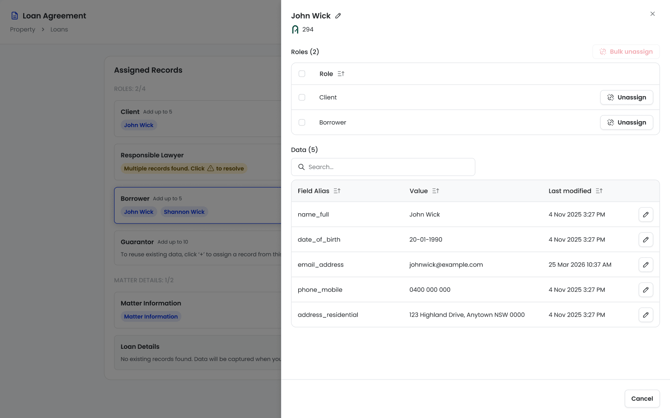
-
One record, multiple roles
A single record can now be assigned to multiple Role record types within the same form. Its data flows into all the relevant field aliases automatically. No more re-keying the same person or entity across sections. -
Clearer conflict resolution
What we used to call a "conflict" is now called an "assignment issue" — because "conflict" means something very specific in legal practice and was causing confusion. When multiple records could fit a role, drafters now see a clear caution icon and a "click to resolve" prompt. Picking a record clears the issue and it won't come back.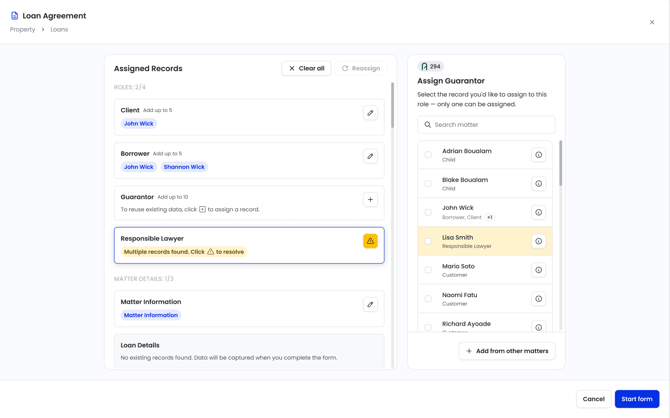
🔗 Learn more here
Other updates
- Support for Middle Name in various areas of the product
- Name field will include a Middle name option that will be always optional
- Middle name in Contacts will support syncing from Actionstep, Clio and Unity
- Middle name in User Profile
- Middle name will be supported in Contact and User Mapping for Builders
- New formatting control - ‘Hide on last repeat’ which hides any content in a repeating content control when its the last repeat
- Client field in Start Form will now automatically display any records that are Client role in the matter. Any records removed will also be unassigned as the Client from the matter.
- Set case for Ordinal by default to Text option
- ABN field in Organisation renamed to Registration Number and no longer validates for ABN only
- Field alias will include a new label option to the field - this is to allow a user friendly name to be applied
🔧 Bug fixes:
- Case option not working correctly for Name field
- Full case options not available for Name types
- UI overflow with Country dropdown