
25 June 2026
Version 7.6.0
This release introduces key builder-focused features: excluding fields and sections from imported section blocks so one comprehensive block can serve every form, keyboard shortcuts to speed up form building, and form-level email notifications that alert the right people when a submission comes in. Other highlights include a Support Office field in the public API, the Unity Party object integration, and a variety of smaller updates and fixes.
🌟 What’s new:
Excluding fields/sections from an imported section block
Section blocks let you author a section once and reuse it everywhere, but until now an importing form had to take all of a block's fields, so a form needing three of eleven fields still showed the end user all eleven. You can now exclude individual fields, or whole sections, of an imported section block on a per-form basis: an excluded field is left out of that form entirely, not shown to the end user, not collected on the form or via intake, and not expected as an API input.
The global block is never touched, so the same block can be imported elsewhere with a different set of fields excluded, and every exclusion is fully reversible. Excluded fields resolve to blank on merge so documents never break, exclusions propagate to child and intake forms automatically, and new fields added at the global level still arrive included by default.
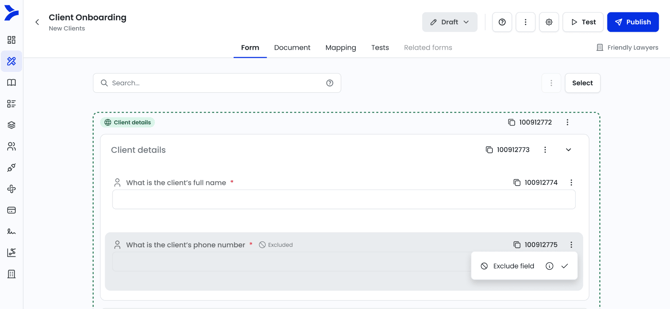 View of an imported section block excluded field
Keyboard shortcuts
Building and editing forms means constant trips between keyboard and mouse, breaking flow on the actions you repeat most: saving, navigating between fields, searching. A set of shortcuts now covers the most common form builder actions, available globally within the builder:
-
Add a field with Ctrl+Shift+F, a section with Ctrl+Shift+S, or a section block with Ctrl+Shift+G, move between fields with the arrow keys, and save without closing using Ctrl+S.
-
Global shortcuts work everywhere too, with Esc to close any modal or panel, Ctrl+Enter to submit it, and / to jump to search.
-
Press ? anywhere to open a reference modal explaining them all, and the toolbar help icon now becomes a dropdown gathering Support Agent, Learning Academy, and Shortcuts in one place.
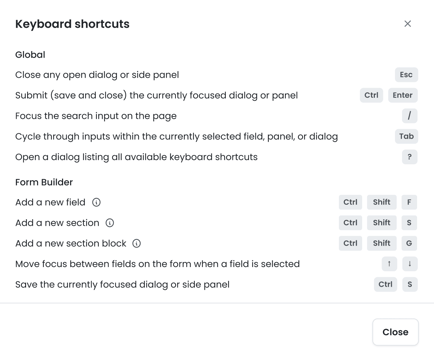
Opening keyboard shortcuts reference
Email notification at the form level
When a form is submitted, you often need a specific person to know about it, such as an accounts team that has to run conflict checks before a new matter is accepted, but until now submission emails could only be configured globally across all forms. A new Emails tab in Form Builder Settings now houses email templates at the form level, with a preset template that triggers on submission and a free-text recipient field that accepts multiple addresses separated by a semicolon.
The sender uses your Email Sender Details from address and display name, a toggle enables or disables each template, and the email sends on both Test and Form Library submissions in Draft and Published. Subject and body both support Insert variable for details like company name, submitter name, submission date, and a submission link, and as part of this we've renamed "Personalise" to "Insert variable" and rebuilt that menu as a scrollable dropdown to fix its old off-screen behaviour.
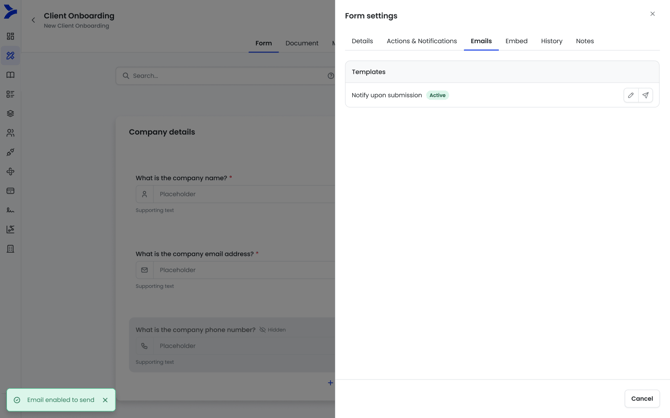
Emails tab in Form Builder settings
Other updates
- Change default decimal places for Number fields
- Given name case option in Name field in add-in
- Public API: Support Office field
- Form section & fields UI changes
- Unity integration: Adding Party object
- Change section block shortcut to open in new tab
- Rename placeholder text in fields
- Moving hide question below Question in a field
- Allowing for opening in new tab option for forms, section blocks and imported section block shortcut
🐞 Bug fixes:
- Limit subject line insert fields for email automation
- Formatting issues with last updated tooltip in form library
3 June 2026
Version 7.5.0
This release introduces Email Automation (Private Beta), letting builders author email output the same way they build documents - so drafters get a ready-to-send email draft instead of manually transposing content into Outlook. It also delivers a full refresh of the Drafter Word add-in, with a modernised interface and a set of Clause Library improvements. Other highlights include a preview option for generated documents, accreditation fields in user profiles, and a variety of smaller updates and fixes.
🌟 What’s new:
Email automation (Private Beta)
Today your firm can automate the document — but not its delivery. Producing the letter still means jumping between Smarter Drafter, File Explorer, and Outlook: copy-pasting the body, re-typing the recipient and subject, and attaching the files by hand.
With the new email automation in Smarter Drafter, you build the email body exactly the way you already build documents — in a Word template, with full support for dynamic fields, conditional rules, calculations, repeats and images. To, CC and Subject are fully configurable, accepting both free text and merge fields from the form, so addressing and referencing happen automatically. You can attach one or more generated documents as PDFs, and you can even create document templates purely to feed an email body — mark them "do not generate for live submissions" and they'll never surface as a standalone output.
When a form is submitted, the email is produced as a ready-to-review .eml draft, available to download alongside the other generated documents. Drafters open it in Outlook or any compatible email client, give it a final review, and send — no new tools, no training. Smarter Drafter prepares the email; the drafter stays in control of sending it.
Note: Email automation is available in private beta.
Drafter Word add-in refresh
We've given the Drafter Word add-in a visual refresh and a set of targeted improvements to the Clause Library. Submissions are unchanged — UI polish only — and creating and inserting clauses works exactly as before. Here's what's new:
- A modernised interface The login screen, home screen, and Clause Library have all been refreshed with a cleaner, more modern look.
- A dedicated Review tab Clauses awaiting approval or that have been rejected now live in their own Review tab, separate from active clauses.
- A clearer clause editing flow To change a clause's content, users now use an "Update clause content" button within the edit form, rather than editing straight from the list.
- Clearer field names "Practice Area" is now called "Clause Type", because clauses can be grouped by many criteria, not just legal practice area. "Short Description" is now "Guidance Notes" - a name that better reflects its purpose of guiding users on how and when to apply a clause.
- Clause history Clauses now include a history log showing when a clause was created, approved or modified, and by whom
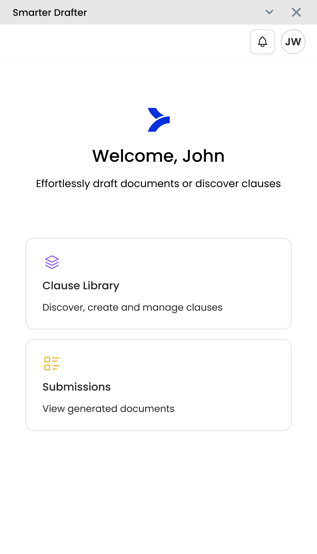
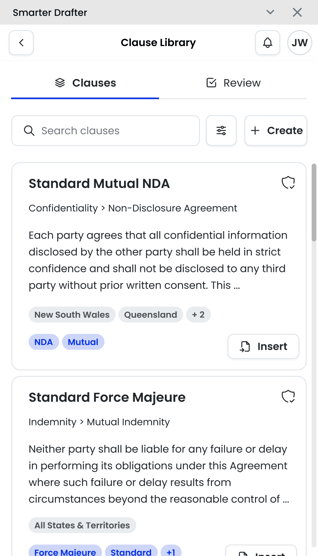
Updated Word add-in for Clause Library and Submissions
Other updates
- Preview option when viewing generated documents
- Accreditation fields in user profile to add accreditation options in automations
- Actionstep mapping: Removing required fields for data collections
- Allow Australian jurisdictions to be deleted in Clause Bank
- Notes in Logic and Calculation
- Display Office name when viewing field alias for a record
- Add search in Replacement Rules
🔧 Bug fixes:
- Fixed an issue causing bulk mapping to be disabled