
10 December 2025
Version 7.1.6
This release introduces a change to the behaviour of Form Settings to be available in both Draft and Published mode, updated Name component in Builder Word add-in, new permission for custom data sources to limit access in form fill to specific users and minor UX improvements to calculations dialog.
🌟 What’s new:
- Enhanced Form Settings
We've redesigned how you access and manage your form's settings to make the building process more intuitive and flexible. Previously, form settings were only visible and editable in the Published mode, which was confusing and prevented you from performing basic configuration changes while still in Draft.
Now, Form Settings are consistently accessible via a new cog icon (⚙️) in the header, whether you are in Draft or Published mode, allowing you to make fundamental changes - like those related to General details, Actions & Notifications, and new Advanced options - at any stage
To streamline your workspace further, we have moved Related Forms and the Actionstep configuration into their own dedicated tabs within the form builder, making these powerful features easier to find and manage when your form is published.
A summary of the updates are listed below:
- Cog Icon: Settings for a form will now sit under a cog icon in the header. Builders can adjust settings in both Draft and Published modes, and any changes will be reflected in both versions of the form.
.png?width=670&height=421&name=Draft_Form%20(1).png)
The new cog icon in the header now centralises all form settings.
- New Settings Groups: Settings have been reorganised into four groups: General (previously Details), Actions & Notifications, Embed, and History. Options such as disabling combined documents or setting placeholder limits have been moved into an Advanced dropdown within the General tab.
- Published-Only: Embed and History are only available in Published mode, as they apply to the Published form.
- Related Forms Tab: Related Forms will move to a tab within the form builder. This tab is disabled in Draft mode and editable in Published mode. The underlying functionality remains the same.
- Actionstep Behaviour: The Actionstep tab follows the same approach: disabled in Draft mode and editable in Published mode, with no changes to behaviour. Actionstep mapping will also be hidden in Child and Intake forms, as mapping inherits from the Parent form. Any updates need to be made in the Parent form.
- Test Visibility: Tests run in a Child or Intake form will now only appear in that form’s Tests tab, rather than showing in the Parent form.
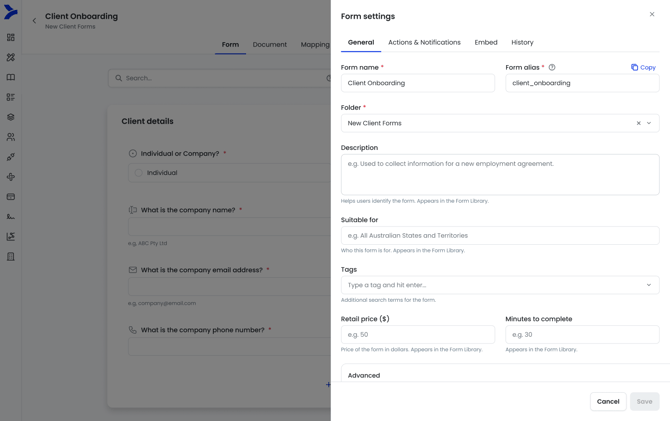
Reorganised Form Settings into four simple groups
-
Updated Builder Word add-in component for Name field
For Name fields, the builder add-in component will- New Given Name option: this will bring in everything in the Given Name field including if there are any spaces in the Given Name field.
- New Middle Name: this will bring in any values that exist after the first space. Eg, if the Given Name had Juan Eduardo, the Middle Name option would bring in Eduardo.
- Label of ‘- None -’ option updated to to Full Name.
- Label of First Name updated to First Name only
- Other updates
- New permission to manage access for users to custom data sources in form fill
- Logic expression areas will now be open by default when there is no logic expressions
- Calculations Start Here dialog UX improvements to better display the form
- Create records using create submission API endpoint
🔧 Bug fixes:
- Currency field reverting back to default after saving or resuming a form
- Unity integration contact address line 2 sync issues