
Intake forms are completed by recipients outside your organisation, so they should look like they come from your firm. Intake Branding lets you set the colours applied to every intake form your organisation sends, including button, header, and background colours.
How to
1. Navigate to Build > Assets > Intake Settings
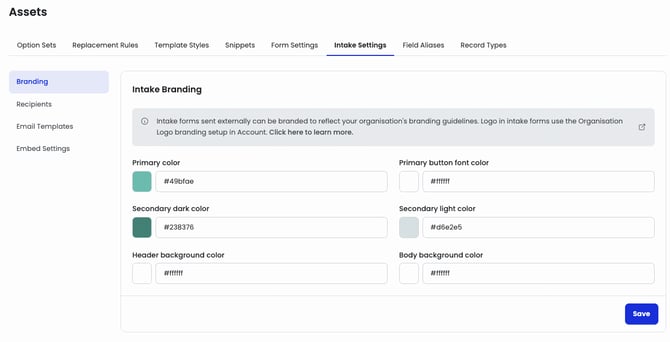
2. In Branding, set each colour option to your branding guidelines by using the colour picker or by entering the HEX code. Use the table below to see where each option appears on the intake form.
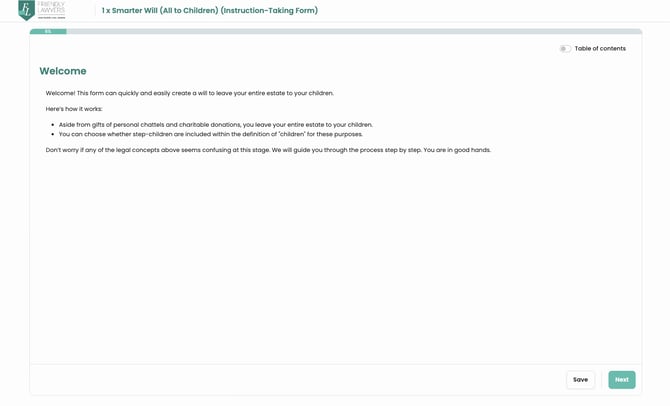
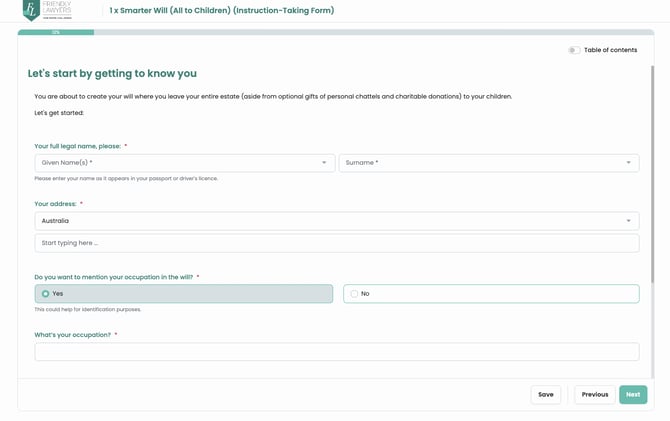
| Intake branding option | Applies to |
| Primary color | Buttons, progress bar, clickable texts |
| Primary button font color | Button font |
| Secondary dark color | Header form name text, Section Headings, Field labels |
| Secondary light color | Button clicked state, hover over of questions |
| Header background color | Top header area background |
| Body background color | Form background |
Reference intake form:
3. To set the logo, go to Account > Organisation & Offices, open Edit organisation, select the Branding tab, and upload an image against the Logo branding type.
4. Test the branding by sending an intake form, either from a Test in the Form Builder or from the Form Library, and opening it as a recipient would.
Common Issues & Solutions
Q: Why isn't my logo appearing on the intake form?
A: The logo comes from your organisation-level branding, not Intake Settings. Check that an image is uploaded against the Logo branding type under Account > Organisation & Offices > Edit organisation > Branding.
Q: Does intake branding apply to individual forms or the whole organisation?
A: Branding is set once at the organisation level and applies to every intake form your organisation sends.
Q: Can I preview the branding before sending an intake?
A: Not currently. To see your branding, send an intake form to yourself and open it as a recipient would.